
What can you actually check?
A safer download decision has several separate parts. Check where the file comes from, whether the URL belongs to the expected release source, whether the downloaded file has the expected name and format, and whether the version matches the release notes. A reachable file is not automatically safe, and an antivirus warning is not automatically proof of malware; both provenance and local security signals matter.
Nucleus Co-op can interact with game processes, windows, input devices, and handler files. That behavior can look unusual to security software even when the file came from the expected project source. It is still reasonable to pause, inspect the source and release asset, scan the file with your security tools, and avoid disabling protection blindly.
| Check | Why it matters |
|---|---|
| Source domain | Official release or clearly identified project source is easier to verify than a random mirror. |
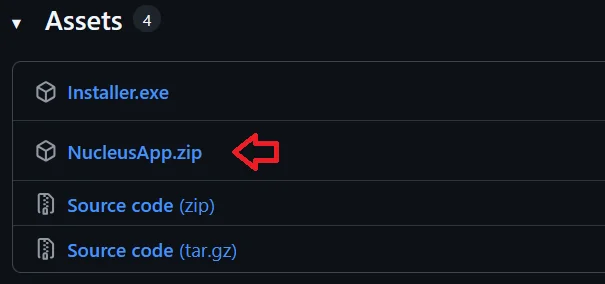
| File name and type | Installer.exe and NucleusApp.zip should not be confused with source-code archives. |
| Version | The release tag should match the version shown in the download guide. |
| File signature | An executable and a ZIP archive have different expected format markers. |
| Game files | Nucleus Co-op is not a game download and should not be bundled with cracked game files. |
Use the official Nucleus Co-op release source
The download page on this site links to the SplitScreen-Me GitHub release assets used by the project. Open the release source, confirm the tag and asset name, and compare the file you download with the page facts. If a new release appears, the version, file size, URLs, prerequisites, and installation notes should be reviewed together before you call it current.
Avoid shortened links, upload sites, repacked executables, “portable” files with no source, and downloads that ask you to replace the application with an unknown launcher. The official repository is the useful provenance trail; a third-party post can be a clue, but it is not the same as a verified release asset.
How to handle antivirus or Windows security warnings
If Windows Security or another antivirus product warns about the file, keep the warning visible and identify the detected file, behavior, and source. Compare the file with the official release asset, rescan it, and check whether the alert concerns the Nucleus Co-op executable, a handler, a mod, or a game file. These are different trust boundaries and should not be merged into one “Nucleus Co-op virus” conclusion.
Do not follow a random guide that tells you to disable antivirus, add a broad exclusion, or download a replacement DLL before you know what was detected. If you decide that a local exception is appropriate, keep it narrow, temporary, and based on a file you obtained from the expected source. Restore normal protection and remove the exception if the test does not solve a verified problem.
- Record the exact detection name and file path.
- Check the official release URL, version, file name, and format.
- Scan the file again with your installed security tools.
- Separate application, handler, mod, and game-file warnings.
- Never install a cracked game or an unofficial executable to bypass a warning.
- Use a clean local folder and keep a copy of the original release information.
Nucleus Co-op does not replace legitimate game ownership
Nucleus Co-op is a Windows utility and handler workflow. It does not provide the games themselves, bypass ownership checks, or make unofficial copies legitimate. Use a normal game installation that launches by itself, then follow the game-specific handler notes. This boundary matters for both safety and troubleshooting because a modified or repacked game can produce errors that are not caused by Nucleus Co-op.
The same rule applies to handlers and mods. Check their source, version, and purpose separately. A community handler may be useful while still being different from the main Nucleus Co-op application. Keep the application, handler, mod, launcher, and game files identifiable so you can remove or roll back one component without replacing everything.
- Use legitimate game installations and official store or publisher sources for the games you own.
- Do not use this site to find FitGirl, cracked, pirated, bypass, or DRM-evasion downloads.
- Treat a handler as game-specific instructions, not proof that a third-party file is safe.
- Keep backups of working settings instead of downloading an unknown replacement build.
A safer first launch checklist
After you obtain the application from the expected release source, install or extract it into a simple local folder with normal read and write access. Open it once before adding several handlers. Then choose one supported game, check that it launches outside Nucleus Co-op, and make a short test session with the simplest controller arrangement you can reproduce.
If the first test fails, keep the exact error, game version, handler version, install path, controller type, and security message. A careful record is safer than changing five unrelated settings or downloading a replacement executable. Use the troubleshooting page to narrow the problem to a dependency, path, handler, input, display, or network layer.
Confirm the source
Use the release link, tag, asset name, and version shown on the download page.
Check the file
Confirm the expected file type, name, and local security scan result.
Install locally
Avoid OneDrive and protected folders while establishing a baseline.
Test one game
Use one handler and one simple input arrangement before adding complexity.
Keep the evidence
Record any warning or error instead of disabling protection or downloading a random fix.
Practical notes for a stable setup
Is Nucleus Co-op safe? FAQ
Is Nucleus Co-op a virus?
Do not decide from a rumor or a random mirror. Check the official release source, file identity, version, and your security product's exact detection. This site does not make an absolute safety guarantee.
Where should I download Nucleus Co-op?
Use the official SplitScreen-Me GitHub release linked from the download page, and compare the release tag and asset name before downloading.
Why does antivirus flag Nucleus Co-op?
The application can interact with game processes, windows, and input devices, which may look unusual to security software. Verify the source and detection instead of blindly disabling protection.
Should I add Nucleus Co-op to antivirus exclusions?
Only consider a narrow, temporary exception after checking the exact file, source, and detection. Do not use a broad exclusion as a first troubleshooting step.
Does Nucleus Co-op include games?
No. It is a Windows utility and handler workflow. Use legitimate game installations and follow each title's own requirements.
Is a handler the same as the main application?
No. A handler is game-specific instruction or compatibility data and may come from a separate documented source. Check its version and provenance independently.
Start with the verified release asset
Use the download page for the checked installer and ZIP links, then read the install guide before adding a handler.
Open the download guide