
Verified Nucleus Co-op release facts
At the time of this page check, the official release page identifies Nucleus Co-op v2.4.1 as the current release used by this guide. The installer response was verified as an executable stream and the ZIP response was verified as a ZIP stream. Release assets can change after a new tag is published, so the version, file size, and download links should always be updated together.
A direct download page is most useful when it tells you exactly what will happen after the click. The Installer.exe file is a small Windows installer. NucleusApp.zip is a much larger portable archive that you extract manually. The ZIP archive is not the same as the repository source-code download, and the source-code archive is not the normal choice for players who only want to run the application.
| Asset | Use it when | Verified detail |
|---|---|---|
| Installer.exe | You want the guided Windows installation path. | 1.05 MB · application/octet-stream · MZ executable signature |
| NucleusApp.zip | You prefer a portable extracted folder. | 96.5 MB · application/octet-stream · PK ZIP signature |
| Source code archive | You are developing or reviewing source code. | Not the normal player download button on this site. |
Which Nucleus Co-op download should you choose?
Choose Installer.exe if this is your first setup and you want the shortest path to a working application folder. Choose NucleusApp.zip if you want to keep the program in a portable directory, move it between local folders, or inspect the extracted files yourself. The portable route is not automatically more compatible; it simply gives you more control over where the files live.
Whichever file you choose, start with a local folder that you can read and write. OneDrive-synchronized folders, protected system directories, and paths with unexpected permission rules can make an otherwise correct install look broken. If you are troubleshooting, use a simple path such as a dedicated games-tools folder and test the application before adding several handlers.
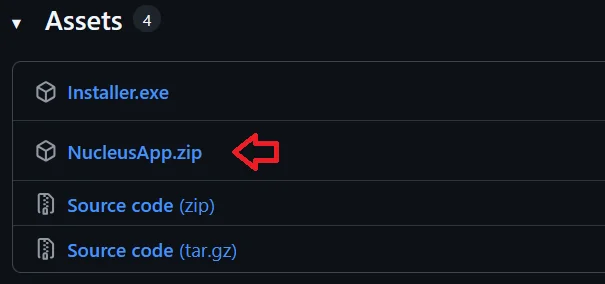
- First-time Windows setup: use Installer.exe.
- Portable or manually managed setup: use NucleusApp.zip.
- Source review or development: use the repository source, not the player download CTA.
- Do not download cracked games, modified executables, or unofficial Nucleus Co-op mirrors from this page.
Windows prerequisites before installation
The official release notes list .NET Framework 4.7.2 or newer and Visual C++ Redistributable 2015–2019 for both x86 and x64. Install or repair those prerequisites before you interpret a launch error as a handler problem. Some built-in download flows may also rely on WebView2; if the handler downloader remains stuck, review the official release notes and the handler guide before repeatedly clicking the same button.
A prerequisite check is also a useful first diagnostic. If the application opens but a particular game fails, the missing dependency may belong to that game or its mod rather than to Nucleus Co-op. Record the exact message, the handler name, and the game version so the next troubleshooting step is based on evidence instead of a long list of unrelated fixes.
| Check | What to do |
|---|---|
| .NET Framework | Install or repair 4.7.2 or newer, then restart if Windows requests it. |
| Visual C++ | Install both x86 and x64 redistributables listed by the release notes. |
| WebView2 | Review this when the handler downloader or embedded page does not load. |
| Game files | Verify the game launches normally outside Nucleus Co-op before adding a handler. |
| Storage path | Use a local writable folder while testing permissions and OneDrive-related issues. |
How to verify a Nucleus Co-op download
Before you open a Nucleus Co-op download, compare the release tag, asset name, file type, and source domain with the official project page. Installer.exe should be treated as an executable installer, while NucleusApp.zip should be treated as a portable archive. A different filename, an unexpected HTML response, or a mirror that hides the version is a reason to stop and re-check the source.
The version check also protects the rest of the setup. A current Nucleus Co-op download can still fail when a game handler expects another application build, but a mismatched file makes every later test harder to interpret. Keep the release date, version, asset name, and handler version in a short note. If you later report a crash or access-denied error, this record tells you whether the problem started before or after the first launch.
After the file is saved, scan it with your normal Windows security tools, confirm that the archive opens as the expected type, and keep the original link available. Do not disable protection globally to force a download through. If a file cannot be verified, return to the official release page instead of choosing a faster unofficial Nucleus Co-op download.
- Confirm the release tag and asset name before opening the file.
- Check that an installer is an executable and an archive opens as a ZIP.
- Record the application version beside the game and handler versions.
- Keep Windows security enabled while you investigate a warning.
- Use the official release page again when a mirror hides provenance.
What to do after downloading Nucleus Co-op
Install or extract the application, open it once, and confirm that Windows can access the folder. Do not immediately add five handlers and several controller tools; a clean first launch gives you a useful baseline. Next, open the supported games list, choose one game, and read the handler notes before you launch multiple instances.
The first successful test should be small: one supported game, one known game version, and the simplest controller arrangement you can reproduce. Once the game launches and each input reaches the intended window, save that working setup as your reference point. If a later mod, update, or controller change breaks it, you can compare against a known-good state instead of starting from zero.
Install or extract
Put Nucleus Co-op in a local folder with normal read and write access.
Launch once
Open the application before adding handlers so you can identify basic permission or dependency errors.
Choose one game
Use the games list and handler notes for the exact game version you own.
Test inputs
Assign one controller or keyboard path per instance and verify the windows separately.
Practical notes for a stable setup
Nucleus Co-op download FAQ
Is Nucleus Co-op free?
The official release assets are provided as a free Windows application; you still need legitimate copies of the games you use.
Should I choose Installer.exe or NucleusApp.zip?
Use Installer.exe for a guided setup. Choose NucleusApp.zip when you prefer to extract and manage the application folder yourself.
How do I download Nucleus Co-op safely?
Use the official GitHub release page or its verified release assets, compare the version and filename, and avoid random mirrors or repacks.
What should I do if handler downloading stays on Please Wait?
Check the network, WebView2 and handler source first, then use the troubleshooting guide. Do not download a random replacement archive.
Continue with installation
After the application opens, read the installation and handler guides before changing game paths or adding several variables at once.
Read the installation guide