
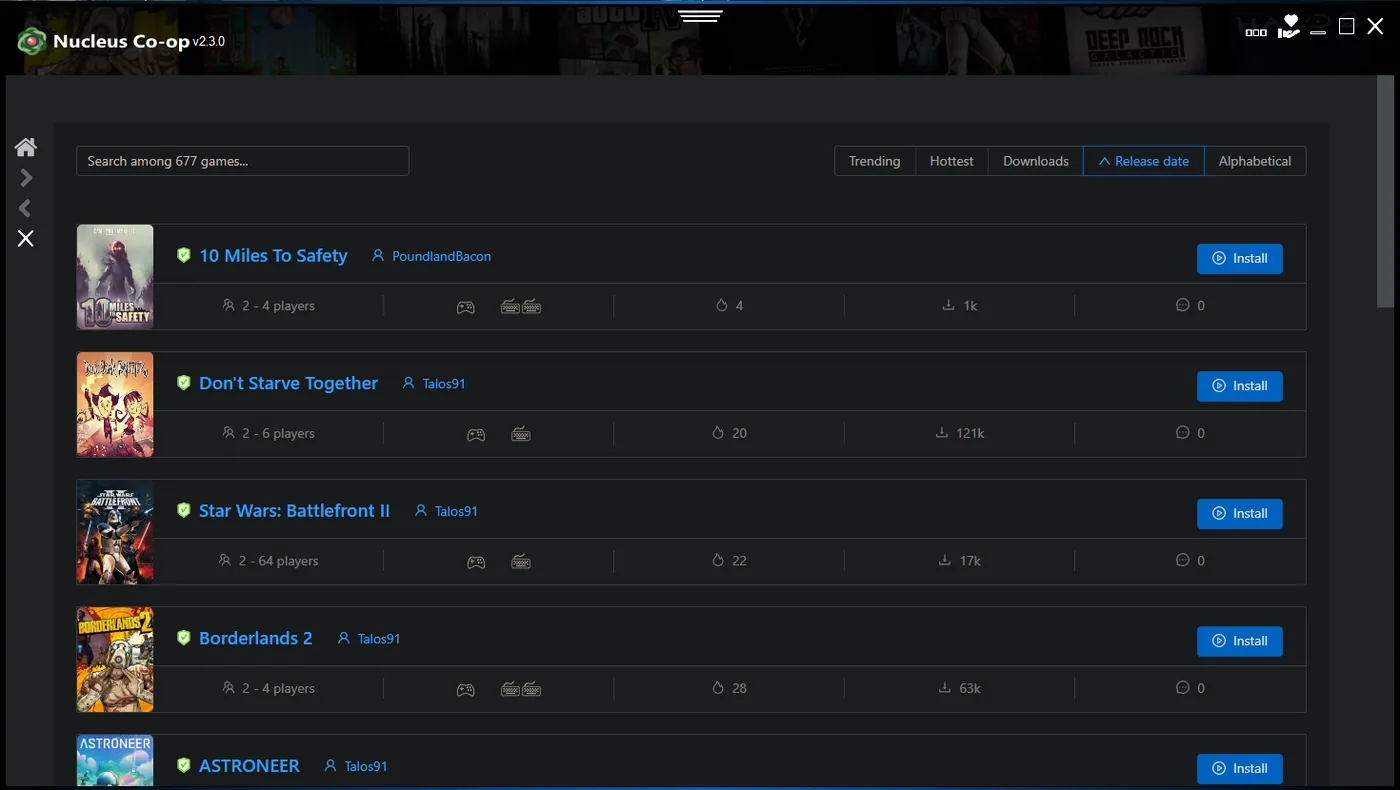
What is Nucleus Co-op and how does it work?
Nucleus Co-op is a Windows utility and handler system for supported PC games. It can help launch multiple game instances, arrange their windows, and separate local input paths. The game and handler still control the actual gameplay, saves, networking, player limits, and compatibility behavior.
The safest mental model is application plus handler plus game. The application supplies the multi-instance workflow, the handler describes title-specific paths and settings, and the game provides the engine and connection mode. A setup that works for one title should not be treated as a universal promise for every PC game.
Nucleus Co-op download and installation questions
Use the verified download page to choose Installer.exe or NucleusApp.zip. The installer is the straightforward first-time choice, while the ZIP is a portable archive that you extract manually. Check the prerequisites, use a local writable folder, launch the application once, and only then add a handler.
Avoid OneDrive-synchronized paths and protected system folders while you establish a baseline. If Windows or antivirus software raises a warning, verify the release source and exact file before changing security settings.
| Question | Short answer |
|---|---|
| Is Nucleus Co-op free? | The release assets are provided as a free Windows application; you still need legitimate game copies. |
| Installer or ZIP? | Use Installer.exe for guided setup or NucleusApp.zip for a manually extracted portable folder. |
| Where should I install it? | Use a simple local writable folder while testing; avoid OneDrive first. |
| Do I install handlers separately? | Usually yes. Handlers are game-specific and may have their own requirements. |
Nucleus Co-op games and handlers
Nucleus Co-op does not support every PC game. Support depends on a compatible handler, the exact game edition and build, the launcher or mod path, input behavior, and the way the title handles multiple instances or multiplayer. A game list is a starting point, not a promise that every current patch works identically.
Choose the exact title in the games directory, read the handler notes, and test one session before adding several modifications. If the handler downloader fails, determine whether every handler fails or only one source, then use the handler troubleshooting steps.
- Minecraft Java and Minecraft Bedrock are different targets.
- Different Call of Duty releases should not be treated as one handler.
- A community guide can become stale after a game or launcher update.
- A handler may require a mod, a particular game build, or a specific connection method.
- Record handler version, game version, player count, and known limitations.
Controller, keyboard, and mouse questions
Many setups use multiple controllers, but device behavior depends on the game, handler, input API, and Windows drivers. Start with two known devices or one keyboard path. If one controller controls both instances, close competing virtual-device tools, disconnect unused controllers, and test one input route at a time.
PS4, PS5, Joy-Con, XInput, DirectInput, keyboard, and mouse setups can expose different behavior. A controller that works in one title may need a translation layer or different handler path in another. Verify the input path before you spend time on resolution or network fixes.
Online, LAN, Wi-Fi, and offline questions
Nucleus Co-op may work offline for some already-installed local workflows, but the handler downloader, game launcher, account service, LAN discovery, mod, or online mode can still need a network. The app does not automatically turn every game into online multiplayer.
Use the game's own LAN, online, lobby, or mod instructions after the instances launch. If the app opens but the instances cannot connect, check the game and handler before assuming that Wi-Fi or a router setting is the missing feature.
Safety, OneDrive, offline, and launch fixes
Use the official release source, compare the asset name and version, and do not download cracked games or random repacks. If antivirus software warns about a file, record the exact detection and verify provenance before you consider any narrow exception. This site does not make an absolute safety guarantee.
For OneDrive or access-denied errors, close the session and move the application and working files to a simple local path. For ProtoInput, shared-controller, resolution, or handler crashes, capture the exact error and change one layer at a time.
How to use this Nucleus Co-op FAQ
This Nucleus Co-op FAQ is organized by the decision you are trying to make: download the application, install it, choose a handler, test a game, separate controllers, connect instances, or investigate a warning. Start with the shortest answer, then open the linked guide when the result depends on a game build or handler version.
Search phrases such as Nucleus Coop download, Nucleus Co-op online, or one controller controlling both instances often describe different layers of the same setup. Identify whether the problem is the application, the handler, the game, Windows input, files, or networking before you apply a fix. A precise layer makes the Nucleus Co-op FAQ answer useful instead of turning every issue into a generic reinstall.
When you ask for help, include the exact game, application version, handler version, launcher, controller type, player count, launch stage, and error text. Keep legitimate game files separate from handlers and back up saves before importing or changing instance paths. These details let the relevant guide answer your Nucleus Co-op FAQ question with fewer assumptions.
- Choose the question that matches the action or error you can see.
- Check the game-specific page when the answer mentions a handler.
- Record versions and launch stages before changing several settings.
- Back up saves and use a local writable path during troubleshooting.
- Return to the official release or handler source when provenance is unclear.
Practical notes for a stable setup
Quick Nucleus Co-op answers
Is Nucleus Co-op available for Windows?
Yes. This workflow is for supported Windows PC installations.
Can Nucleus Co-op play every game?
No. Support depends on the game, handler, build, launcher, input behavior and connection method.
Can Nucleus Co-op games work online?
Only when the specific game and handler provide a workable LAN, online or mod-based connection route.
Does Nucleus Co-op need Wi-Fi?
Some local tasks can work offline, but handler downloads, LAN discovery, mods, accounts and online services may need a connection.
How do I import a save into Nucleus Co-op?
Save behavior is game- and handler-specific. Read the game notes and back up the original before copying or changing instance paths.
How do I uninstall Nucleus Co-op?
Close the app, remove its installed or extracted folder and review handler-generated files separately. Keep game files and saves unless you intentionally back them up.
How do I allow Nucleus Co-op through the firewall?
Identify the process that needs access and allow only the required application after checking the game’s connection needs. Do not disable the firewall globally first.
Is Nucleus Co-op safe?
Use the official release source, compare the filename and version, scan the file and avoid random mirrors. Treat safety as a verification process, not an absolute guarantee.
Start with the exact game
Game-specific handler notes are more useful than a universal rule. Choose a title from the supported games directory.
Browse the games list